
Agents
Tasks and schedules
Keep an instruction you run again as a task, and send it on a schedule or in your quiet hours.
A task is an instruction you keep: a weekly report, a dependency check, a round of copy edits. Every agent of the project has it, and you can run it on a schedule.
Save a task#
Tasks are saved from a conversation. When a session did something you want again, ask for it:
Save what you just did as a task called Weekly churn report, so it works without this conversation.
The agent writes the instructions so they work on their own, and Iterada confirms it with a "Task saved" notice in the conversation. Your tasks are listed under Agent factory, then Tasks.
Run it again#
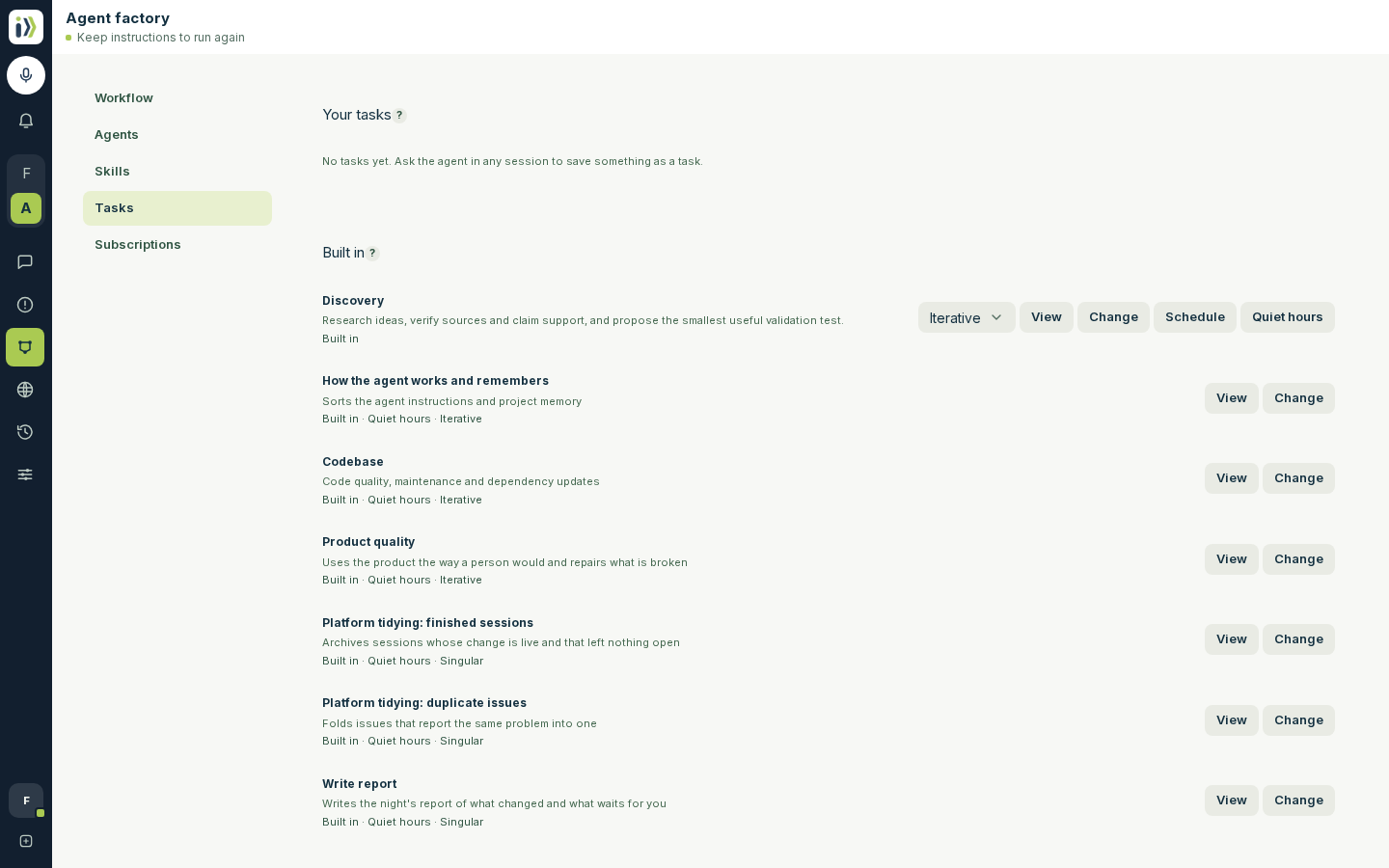
On a task's row:
View shows the task's instructions and where it runs.
Change opens a session to say what should be different.
Schedule sends it on a schedule of your choosing: pick a Timezone and fill in Cron expression, the minute, hour, day, month and weekday it runs on.
Quiet hours puts it in your quiet hours, beside the optimizer's own work: see Work in quiet hours. Once it is in, the button reads Leave quiet hours, and an iterative task offers Set its share to open the Quiet hours workflow.
Iterative or Singular, the choice on its row, says how it runs there: iterative works through it pass after pass for its share of quiet hours, singular gives it one pass per quiet hours before the iterative tasks. The agent that saved it chose one. Quiet hours need at least one iterative task, so the last task with a share cannot be made singular.
The task's name renames it: click it, type the new name and press Enter, or Escape to keep the old one.
Delete removes the task and its schedules.
On a phone, Change, Quiet hours and Delete wait under the row's More button.
Under Built in are the tasks that come with Iterada. Discovery and Security audit have the same row as your own, except that they cannot be renamed or deleted: ask for one by name, schedule it or put it in quiet hours, and Change saves a version of it for this project. Security audit runs Cloudflare's security audit method on one part of your code each time, starting where the last run stopped, and files each security hole it confirms as an issue; it is there while the security-audit skill is turned on. The optimizer's own quiet-hours tasks - How the agent works and remembers, Codebase, Product quality, Platform tidying and Write report - have View and Change only. View shows what the task does, what it may touch and your project's own brief for it, and Change opens a session to adjust that brief.
Send a message on a schedule#
To repeat a message from a session as it is, open the arrow beside Send and choose Send on a recurring schedule, then press Create recurring send. The message is saved as a task first, so you can change it later in one place.
Updated · View as Markdown · What changed recently