
Build
Parallel sessions and subagents
Run several coding agents in parallel, each session on its own branch, and merge their work together into your default branch. See what subagents did.
Several coding agents can work on one larger piece of work at once, each in its own session and on its own branch, without stepping on each other. Iterada then merges their work together.
Split the work#
Write the larger request in the message box.
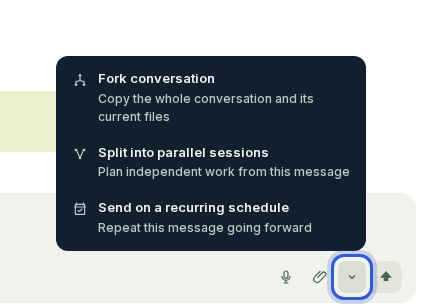
Open the arrow beside Send and choose Split into parallel sessions, then press Plan the split.
The agent answers with a plan: the sessions it would open, which of them must wait for another, and what it costs against one session.
Tick the agents to spread the sessions across, and press the plan's start button, which says how many sessions it opens, such as "Start 3 sessions".
Build a referral programme: a share link on each customer's account page, a reward applied at the referred customer's first payment, and a referrals table in the admin area.
The sessions open together and run side by side. One that depends on another starts once the other has finished its first turn; until then it reads "Waiting for" the sessions it needs. Once they are open, the plan in the conversation becomes the set's live list: a line for each session with its mark and what it is doing, which opens that session when pressed, and a line such as "2 of 3 parallel sessions finished".
Follow them#
In the sessions list, the sessions sit indented under the conversation you planned them in, joined to it by a column of dots, so it reads as their parent. That conversation stays at the head of the set even after it has gone inactive or when a filter would leave it out, so you can always see where the work came from. Opening that conversation or any of its sessions shows all of them as tabs along the top, the planning conversation first, so you can move between them without going back to the list. When a session of the set splits its own work again, its sessions and any subagents follow it in the tabs, before the next session of the set.
Archiving the planning conversation asks first while any of its sessions is not deployed yet: archive those too, or keep them open on their own. Sessions of one plan are one piece of work, so an automatic merge of any of them waits while another is still changing files, and they reach your default branch together.
Subagents#
An agent may start subagents of its own - helpers that research or check part of a task side by side. You do not start them; you see them.
In the conversation, each subagent's task and its answer stand in that turn's activity, with Open subagent to read everything it did. The subagents of a session's latest turn are also listed right under it in the session list; an earlier turn's are reached from that turn in the conversation, and from the Open subagent action under its last reply.
A subagent's page is read-only: subagents take instructions only from the main agent. Press Back to main session to write.
Whether an agent may start subagents is set per agent with Autonomous subagents, in Agents.
Fork a conversation#
To try a different direction without losing this one, open the arrow beside Send and choose Fork conversation. The new session starts with the whole conversation and its current files, and your first message for it.
Updated · View as Markdown · What changed recently